
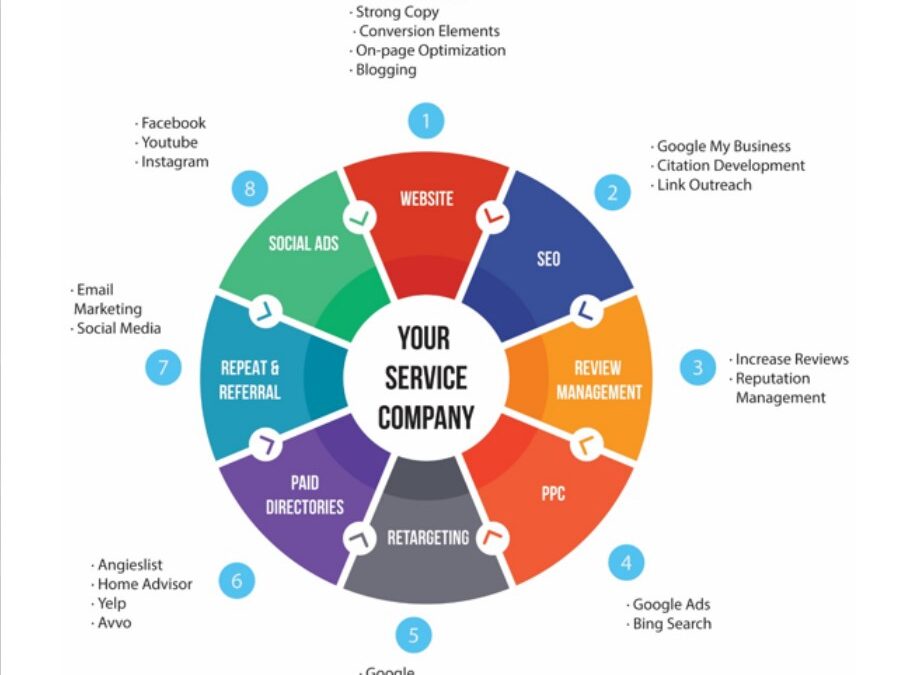
Google Business Profile Optimization Explained: Everything You Need to Know
In the digital age, having a robust online presence is imperative for businesses of all sizes. One of the most powerful tools available to improve visibility and attract potential customers is the Google Business Profile. This guide will walk you through everything you need to know about optimizing your Google Business Profile for maximum impact.
What is a Google Business Profile?
A Google Business Profile (GBP), previously known as Google My Business, is a free tool provided by Google that allows businesses to manage their online presence across the search engine and its expanding portfolio of utilities. By creating and optimizing a GBP, you increase the likelihood of appearing in local search results, making it easier for customers to find your business.
Why is Google Business Profile Important?
Google Business Profile is crucial for local SEO. When potential customers search for services or products near them, Google provides a list of businesses that match the criteria, often displayed in the Local Pack or Google Maps. An optimized GBP increases your chances of being featured prominently in these results, which can significantly boost your visibility and customer engagement.
Setting Up Your Google Business Profile
Setting up a GBP is a straightforward process, but it requires attention to detail to ensure accuracy and completeness. Follow these steps to create your profile:
Create or Claim Your Business
First, visit the Google Business Profile website and log in with your Google account. If your business is already listed, you can claim it by verifying ownership. If not, you’ll need to create a new listing by providing your business name, address, and phone number.
Verify Your Business
Verification is a crucial step to ensure that you are the legitimate owner of the business. Google typically sends a postcard with a verification code to your business address. Enter the code in your GBP dashboard to verify your listing.
Complete Your Business Information
Once verified, fill out your business information in full. This includes your business name, address, phone number, website, hours of operation, and service areas. The more complete your profile, the better your chances of ranking high in local search results.
Optimizing Your Google Business Profile
After setting up your GBP, optimization is key to enhance visibility and attract more customers. Here are essential optimization strategies:
Use Accurate and Consistent Information
Ensure that your business information is accurate and consistent across all online platforms. This consistency builds trust with both Google and potential customers.
Choose the Right Business Categories
Select primary and secondary categories that best describe your business. These categories help Google understand your business and match it with relevant searches.
Add High-Quality Photos
Visual content is crucial for engagement. Upload high-quality images of your business, products, and services. This not only attracts potential customers but also enhances your profile’s attractiveness.
Encourage and Respond to Reviews
Customer reviews are a significant factor in local SEO. Encourage satisfied customers to leave positive reviews on your profile. Respond to reviews, both positive and negative, to show that you value customer feedback and are committed to improvement.
Utilize Google Posts
Google Posts allow you to share updates, offers, and events directly on your GBP. This feature keeps your profile fresh and informs potential customers about what’s happening in your business.
Monitor Insights
Google provides insights into how customers interact with your profile. Monitor these analytics regularly to understand customer behavior and adjust your strategy accordingly.
Advanced Google Business Profile Tips
Once you have the basics covered, consider these advanced tips to further enhance your GBP:
Implement Keywords Strategically
Incorporate relevant keywords into your business description, services, and posts. However, avoid keyword stuffing as it can negatively impact user experience and ranking.
Optimize for Voice Search
With the rise of voice search, optimizing your profile for this feature can give you an edge. Use natural language and long-tail keywords that mimic conversational queries.
Leverage Q&A Feature
Google’s Q&A feature allows potential customers to ask questions directly on your profile. Monitor this section regularly and provide informative answers to improve customer engagement.
Use Google Maps to Your Advantage
Optimize your presence on Google Maps by ensuring your location is correctly marked. Encourage customers to check in when visiting, as this can enhance your profile’s visibility and credibility.
Conclusion
Optimizing your Google Business Profile is a dynamic process that requires regular updates and engagement. By following these guidelines, you can ensure that your business stands out in local searches, attracts more customers, and ultimately grows your business. Stay informed on the latest updates and trends in local SEO to keep your profile competitive and effective.